Color test page
Print at 100% scale, not "fit to page", on plain white paper.
- every ink and overprint is present and solid, with no streaks,
- the hue sweep changes step by step, with no step missing or doubled,
- the grays stay gray and the skin tones look natural.
Free color test page from testpagelab.com. For ink-exact color, print the CMYK PDF.
The print button prints only the sheet above. The PDFs carry the same checks as CMYK-native files, which ask for each ink directly instead of through your browser's RGB; the methodology explains the difference.
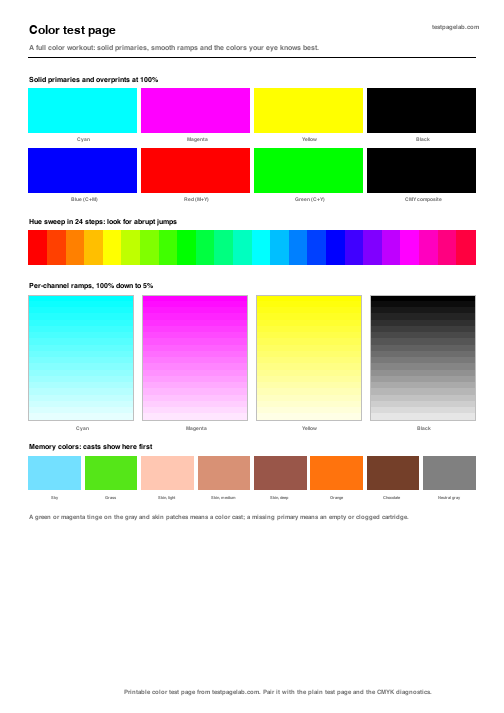
This color test page prints in one click, straight from your browser, and checks every part of your printer's color: each ink on its own, the inks mixed, a run through the whole hue range, and the colors your eye knows best. The sheet above is the printer color test itself. Press the button, print it on plain white paper at 100% scale, and you have a color test print that shows in a minute whether a cartridge is empty, a nozzle is blocked or the whole page leans toward one color.
It is a free, printable printer color test with nothing to install and nothing to upload. If you would rather test printer color from a file, the same checks come as a PDF in A4 and US Letter below.
What the color test print checks
The color test print page is built in five blocks, top to bottom. Read it in that order, because each block narrows down what the one before it found.
- Inks and overprints. Cyan, magenta, yellow and black at full strength, then blue, red and green made by laying two inks over each other, and a dark patch made from all three colors. A pale or missing patch in the first row points at one cartridge. A wrong color in the second row, under a good first row, points at the mix rather than the ink.
- Hue sweep. Twenty four steps around the color wheel, each a little different from the next. A step that jumps, or two steps that look the same, means one ink is running short, which a solid patch can hide.
- Channel ramps. Each ink from 100% down to 10%. The light end is where a failing nozzle shows first, as a gap or a streak across the ramp.
- Neutral grays. Eleven steps from white to black. They should stay gray all the way down. A green or magenta tinge is a color cast.
- Memory colors. Sky, grass, three skin tones, orange, chocolate and a neutral gray. You know how these should look without a reference, which makes them the fastest place to spot a cast.
How to print a color test page
- Load plain white paper. Tinted or recycled stock shifts every patch on the sheet.
- Press Print this page. The button prints only the sheet, not the rest of this page.
- In the print dialog, set the scale to 100%, not fit to page. The sheet asks for its colors itself, so the background graphics setting does not matter here.
- Print in the color mode you normally use. A grayscale or ink saving mode turns the printer color test into a black test.
To print color test pages in CMYK, use the PDF instead. A browser can only describe color as RGB, so your driver converts the sheet above before it prints. The print color test page PDF asks for cyan, magenta, yellow and black ink directly, which is what you want when you are checking one cartridge. The methodology explains the difference.
Reading the result
Your test print color should match the screen closely, never exactly: paper, ink and driver all move it a little. What matters is a change you can name. Every printer test color on the sheet is labelled, so check the print test color by color against this table.
| What you see | Most likely cause | What to do |
|---|---|---|
| One ink pale or missing in the first row | Empty or clogged cartridge | Replace it or run a head cleaning, then print again |
| Streaks or gaps across one ramp | Blocked nozzles in that ink | Run the printer's nozzle check and cleaning |
| A jump in the hue sweep, or two steps alike | One ink running low | Check the ink levels |
| Grays with a green or magenta tinge | A color cast | Check the paper setting and each ink level |
| Skin tones too red or too yellow | Magenta or yellow too strong | Match the paper type in the driver to the paper in the tray |
| Every patch faded | Draft or ink saving mode | Switch to standard quality and print again |
A clean result does not prove perfect color. It proves that every ink reaches the page, in the right proportions, with no blocked nozzles. Color managed accuracy needs a profile made for your paper, which no printable sheet can give you. The guide to reading a test print covers streaking, banding and ghosting in more detail.
Color test PDF downloads
The PDF is the color print test page in its measurement grade form: the same blocks, drawn in points and filled with CMYK ink values, so nothing is converted on the way to the printer.
Checking one ink at a time
This sheet tests the inks together. When it points at one of them, the diagnostics on the printer test page have a sheet for each ink on its own, a nozzle check pattern and a coverage test. On the full printer test page color takes one row, next to black text, line weights and a scale check; here color gets the whole sheet. Print the printer test page when you want everything on one pass.
Frequently asked questions
What is a color printer test page for?
It shows whether each ink reaches the paper, in the right amount, with no blocked nozzles. Print one when colors come out wrong, after you change a cartridge and before a large photo job, so a fault costs one sheet instead of a stack. A color print test takes one sheet and about a minute.
How often should I make a test color print?
Whenever colors look off, and after every cartridge change. An inkjet that has sat unused for a few weeks is worth a test color print before anything important, because ink dries in the nozzles and the first page out shows it. Laser printers need it far less often.
Why does my printer print color wrong when the test page looks fine?
Then the inks are working and the problem is in the file or the settings. Check that the paper type in the driver matches the paper in the tray, that the document is not set to grayscale or draft, and that the photo carries no unusual color profile. A clean printer color test page next to wrong photos almost always means settings, not hardware.
Is a colour test page the same as a color test page?
Yes. Colour is the British spelling, and nothing on the sheet changes. A colour test print from this page checks the same inks, and most readers outside North America will want the A4 file. If a manual asks for a colour print test or a printer colour test, this sheet does the job: it is a colour printer test page in everything but spelling, and the colour print test page PDF above is CMYK-native in both paper sizes.
Is this color test page free?
Yes. There is no account, nothing to install and nothing uploaded. Your browser draws the sheet, and the PDFs are plain files. Unlike a printer color test image saved from the web, the sheet is drawn at its true size, so printing it at 100% scale gives the same page every time.