Printable graph paper, true to scale
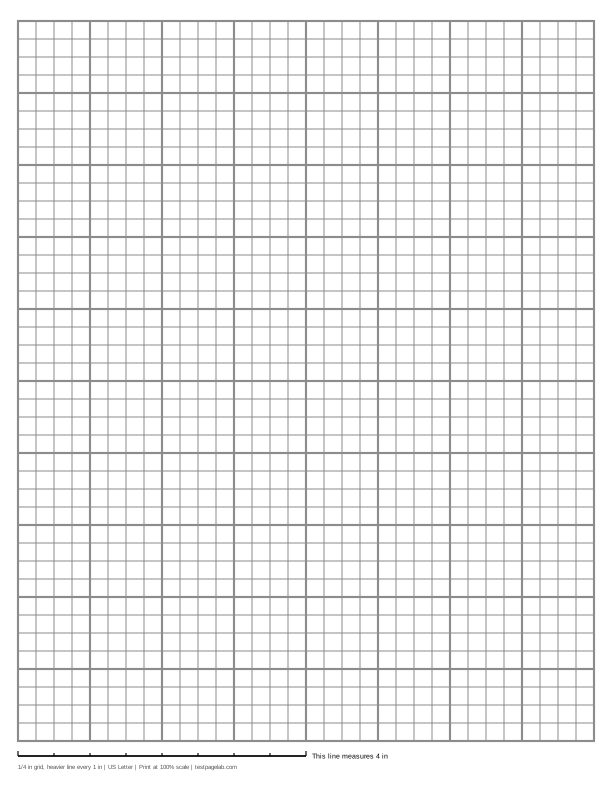
Print at 100%. In the print dialog choose Actual size (or Scale: 100), not Fit to page. Then hold a ruler to the line at the bottom of the sheet.
How to print at actual size, dialog by dialog
- Chrome and Edge: open More settings, find Scale, and pick Actual size if it is listed. If it is not, pick Custom and type 100. Avoid Fit to printable area and Fit to paper.
- Firefox: untick Fit to page width, then set Scale to 100.
- Safari and Preview on a Mac: set Scale to 100%, not Scale to Fit.
- Adobe Acrobat and Reader: under Page Sizing, choose Actual size. The file already asks for it.
- iPhone and iPad: the print sheet has no scale setting. Print, then measure the line.
- Android: this depends on the printer app. Turn off any Fit to page option, then measure the line.
- Any browser: pick the file that matches the paper in your printer. A US Letter file on A4 paper, or the reverse, gets shrunk to fit.
This is printable graph paper you set up yourself. Pick the size of the squares, how often a heavier line falls, how dark the lines print, and whether the sheet is US Letter or A4. The preview follows every change, and the PDF you download is drawn at the exact size you asked for, so a 1/4 inch square prints 1/4 inch wide.
Every sheet carries a calibration line along the bottom: 4 inches long on inch grids and 10 cm long on metric ones. Hold a ruler to it after printing. If the line is right, every square on the page is right. If it is short, the printer shrank the page, and the section on checking your print below says by how much and why.
The default is the grid most people mean by graph paper. On US Letter that is 1/4 inch squares with a heavier line every inch, 32 squares across and 40 down, a grid exactly 8 by 10 inches. On A4 it is 5 mm squares with a heavier line every centimeter, 38 by 54 squares, a grid 19 by 27 cm.
How the generator works
The grid is built from whole squares, centered on the page. It always stops on a full square, or on a full block when you ask for a heavier line, so its edge is a line you can count from. The margins are the smallest white border on each side; below the grid, a strip holds the calibration line.
Spacing is the side of one square: type 1/4, 0.2 or a size in millimeters. The heavier line falls every 2, 4, 5 or 10 squares, or not at all. Line weight runs from Fine (0.25 point lines) to Bold (0.6 point), where a point is 1/72 inch. Non-photo blue is a pale blue that many copiers and black and white scans leave out, so only your pencil marks come through.
The graph paper PDF is written by code running in this page. It holds real lines rather than a picture of lines, so it stays sharp at any printer resolution, and a full sheet is about 3 KB.
Print it at 100%, not fit to page
Print dialogs shrink pages a little so nothing is cut off. For graph paper that is the one thing you do not want: a shrunk page is still a tidy grid, but its squares are no longer 1/4 inch or 5 mm.
So when you print, choose Actual size, or set Scale to 100. The file asks viewers not to scale it, and Adobe Acrobat and Reader follow that request. Chrome's built-in PDF viewer, which is what opens most downloads, does not, so in Chrome or Edge open More settings and set Scale to Actual size, or to Custom and 100 if Actual size is not listed. The steps for other browsers and phones are in the list under the download buttons.
Match the file to the paper in your printer, too: a Letter file on A4 paper, or the reverse, gets shrunk to fit even at 100%.
Check your print with the calibration line
The line at the bottom of every sheet is exactly 4 inches long on inch sheets and exactly 10 cm long on metric sheets. Lay a ruler along it with zero at the left end. The small ticks mark every half inch or every centimeter, which checks the ruler's alignment as well as the total.
| The 4 in line measures | The 10 cm line measures | What happened |
|---|---|---|
| 4 in, within about 1/32 in | 100 mm, within about 0.5 mm | Printed at actual size. |
| about 3 7/8 in (3.89 in) | about 97.3 mm | A US Letter file was shrunk to fit A4 paper. |
| about 3 3/4 in (3.76 in) | about 94.1 mm | An A4 file was shrunk to fit US Letter paper. |
| about 3.8 to 3.9 in | about 95 to 97 mm | Fit to printable area or Fit to page was on. |
| about 4 1/16 to 4 1/8 in | about 102 to 103 mm | Borderless printing enlarged the page. |
If the line is off by some ratio, every square is off by the same ratio. A line of 3.89 inches means the 1/4 inch squares came out about 0.243 inch wide, and a row of 32 of them is about 7/32 inch short across the sheet.
Which grid to print
- 1/4 inch graph paper, also sold as quad ruled paper: four squares to the inch, the usual US ruling for math.
- 1 cm graph paper: large squares for area, perimeter and bar graphs, and they match the centimeter cubes used in classrooms.
- 5 mm graph paper: the squared ruling of European exercise books, two squares to the centimeter.
- Isometric graph paper: triangles instead of squares, for drawing three-dimensional objects.
- Dot grid paper: a dot at every crossing instead of a line, for bullet journals, lettering and sketching.
PDF or PNG
The PDF is the file to print. It is vector, it has the page size built in, and it is the only one that can carry the request not to scale.
The PNG is for note-taking apps that want an image as a page background. It is drawn at 300 pixels per inch and says so inside the file, but many image viewers fit a picture to the paper when printing, so print from the PDF. Ready-made PDFs of the two default sheets, the printable grid paper PDF most people want, sit under the download buttons.
What this page does not do
It does not upload anything, and there is no account. It cannot see your printer or change its settings, which is why the calibration line is there. The preview is a picture of the sheet, not the sheet at actual size, so do not hold a ruler to the screen.
Frequently asked questions
What size are the squares on standard graph paper?
In the US, 1/4 inch: four squares to the inch, often sold as quad ruled paper. Elsewhere 5 mm is usual, with 1 cm squares for younger students. Engineering pads often use 1/5 inch. All of them can be set above.
How do I print graph paper at the right size?
Download the PDF for the paper that is in your printer. In the print dialog choose Actual size, or set Scale to 100, and turn off anything called Fit to page. Then measure the line at the bottom of the sheet: it should be 4 inches on an inch grid or 10 cm on a metric one.
Why is my printed grid smaller than it should be?
The print dialog scaled the page to fit. The most common causes are Fit to printable area in Chrome or Edge, and printing a US Letter file on A4 paper. The table in the section on checking your print turns the length of the line into the cause.
What is the difference between graph paper and grid paper?
None in practice. Both are ruled into squares; graph paper is the school name and grid paper the general one.
Is this graph paper free, and is anything uploaded?
It is free and there is no account. Each sheet is drawn by code running in your browser. The only thing sent anywhere is an anonymous count of page views and downloads, described on the privacy page.