Cornell notes paper
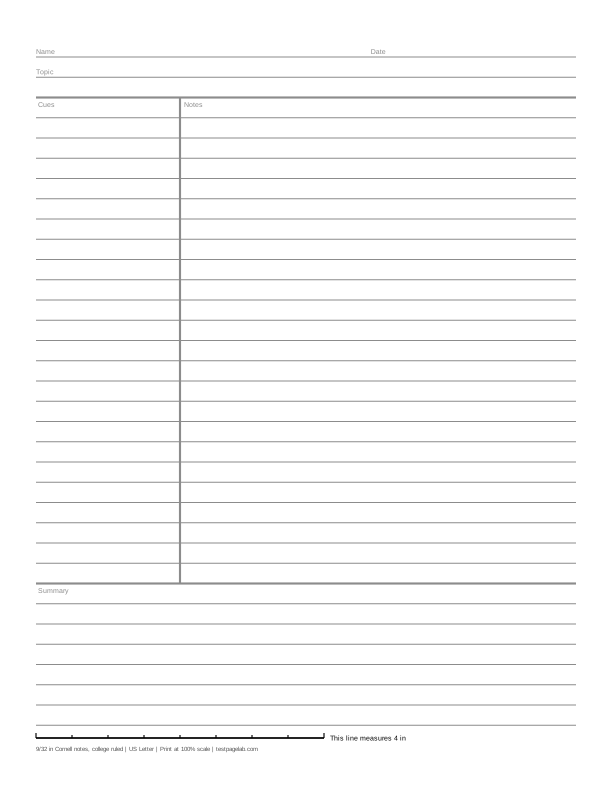
Print at 100%. In the print dialog choose Actual size (or Scale: 100), not Fit to page. Then hold a ruler to the line at the bottom of the sheet.
How to print at actual size, dialog by dialog
- Chrome and Edge: open More settings, find Scale, and pick Actual size if it is listed. If it is not, pick Custom and type 100. Avoid Fit to printable area and Fit to paper.
- Firefox: untick Fit to page width, then set Scale to 100.
- Safari and Preview on a Mac: set Scale to 100%, not Scale to Fit.
- Adobe Acrobat and Reader: under Page Sizing, choose Actual size. The file already asks for it.
- iPhone and iPad: the print sheet has no scale setting. Print, then measure the line.
- Android: this depends on the printer app. Turn off any Fit to page option, then measure the line.
- Any browser: pick the file that matches the paper in your printer. A US Letter file on A4 paper, or the reverse, gets shrunk to fit.
Cornell notes paper divides a lined page into three parts: a narrow cue column on the left, a wide column for your notes on the right, and a summary across the foot of the page. This page starts from that sheet on college ruled lines: Name, Date and Topic at the top, the cue line 2 1/2 inches from the left edge of the paper, and about 2 inches of summary lines. A US Letter page holds 24 lines of notes and 7 of summary.
The layout comes from Walter Pauk's How to Study in College, written at Cornell University. This printable Cornell notes template keeps it plain: the lines, their labels and the calibration line, as a PDF for US Letter or A4.
Cornell notes paper, measured
Every line on this Cornell notes paper is placed at its own distance from the first, a whole number of 9/32 inch steps, so the bottom line is as exact as the top one. The lines run the full width of the page, across the cue column as well as the notes, and the summary is ruled the same way. The line under the header and the line above the summary are drawn a little heavier, and so is the cue line, which runs only through the notes area.
On Letter, inside half inch margins, that makes the cue column 2 inches wide and the notes column 5 1/2 inches. The summary takes 7 rows, 1.97 inches. The A4 sheet switches to 7 mm lines inside 12 mm margins and puts the cue line at 64 mm from the edge: 27 lines of notes and 7 of summary, 49 mm.
Gray is the default color; black copies better, and Non-photo blue vanishes from most scans. The labels print in the same color as the lines.
How to take Cornell notes
- During the lecture or the reading, write in the notes column. Short sentences, abbreviations and quick diagrams; leave a line between ideas.
- Soon after, fill the cue column. Beside each block of notes, write a question it answers or a keyword that brings it back.
- Write the summary. Two or three sentences at the foot of the page, in your own words: what the page was about.
- Review from the cues. Cover the notes column, read each question in the cue column, and answer it before you look.
The cue column only helps if a whole question fits in it, which is why this Cornell note paper keeps the classic 2 1/2 inches.
College or wide ruled
| Ruling | Space between lines | Note lines on US Letter | Summary lines on US Letter |
|---|---|---|---|
| College ruled | 9/32 inch (7.14 mm) | 24 | 7 |
| Wide ruled | 11/32 inch (8.73 mm) | 18 | 6 |
On A4 the same two sheets use 7 and 8 mm lines: 27 and 23 lines of notes, 7 and 6 of summary. The wide ruled Cornell notes PDFs sit beside the college ruled ones under the download buttons. Narrow ruled (1/4 inch) and 3/8 or 1/2 inch lines are in the Line spacing list above, as are 6, 9 and 10 mm.
- Lined paper: plain lines in any ruling, with or without a red margin line.
- College ruled paper and wide ruled paper: notebook sheets without the columns.
- Handwriting paper: three-line rows with a dashed midline, for letter practice.
Print it at 100%, not fit to page
Print dialogs shrink pages a little so nothing is cut off, and on Cornell notes paper the shrink moves the cue line and the lines with it.
So when you print, choose Actual size, or set Scale to 100. Adobe Acrobat and Reader follow the file's request not to scale it; Chrome's built-in viewer does not, so in Chrome or Edge open More settings and set Scale to Actual size, or to Custom and 100. The steps for other browsers and phones are in the list under the download buttons.
Print the Letter file on Letter paper and the A4 file on A4. A file printed on the other size gets shrunk to fit even at 100%.
Check your print with the calibration line
The line at the bottom of every sheet is exactly 4 inches long on inch sheets and exactly 10 cm long on metric sheets. Lay a ruler along it with zero at the left end; the small ticks mark every half inch or every centimeter.
| The 4 in line measures | The 10 cm line measures | What happened |
|---|---|---|
| 4 in, within about 1/32 in | 100 mm, within about 0.5 mm | Printed at actual size. |
| about 3 7/8 in (3.89 in) | about 97.3 mm | A US Letter file was shrunk to fit A4 paper. |
| about 3 3/4 in (3.76 in) | about 94.1 mm | An A4 file was shrunk to fit US Letter paper. |
| about 3.8 to 3.9 in | about 95 to 97 mm | Fit to printable area or Fit to page was on. |
| about 4 1/16 to 4 1/8 in | about 102 to 103 mm | Borderless printing enlarged the page. |
If the line is short, every part of the sheet shrank by the same ratio. A 3.89 inch reading puts the cue line about 2.43 inches from the edge of the page instead of 2 1/2, and the 9/32 inch lines about 0.274 inch apart.
PDF or PNG
Print from the PDF: it is vector, at the exact page size, and asks the viewer not to scale it. The PNG is the same sheet at 300 pixels per inch, for a note app that writes over an image.
What this page does not do
It prints the sheet. It is not a form to type into or a Word or Google Docs template: the labels are printed words, not fields. Nothing is uploaded, there is no account, and the page cannot see your printer; the calibration line is how you check the result.
Frequently asked questions
What is Cornell notes paper?
A lined sheet split into a cue column on the left, a notes column on the right and a summary at the bottom, for the Cornell method of taking notes: notes during class, questions in the cue column afterwards, and a short summary to finish the page.
How wide is the cue column on Cornell notes paper?
The classic layout puts the cue line 2 1/2 inches from the left edge of the paper and keeps the bottom 2 inches for the summary. This sheet does the same on Letter. On A4 the line is at 64 mm and the summary about 50 mm, rounded to whole lines.
How many lines are on Cornell notes paper?
College ruled on Letter, with half inch margins: 24 lines of notes and 7 of summary, plus Name, Date and Topic. Wide ruled gives 18 and 6, and on A4 the 7 and 8 mm sheets give 27 and 7, and 23 and 6.
Is there a Cornell notes template for A4?
Yes: the ready-made A4 Cornell notes PDF has 7 mm lines and the cue line at 64 mm, and the wide ruled A4 file uses 8 mm lines.
Is this Cornell notes paper free to print?
Yes. There is no account and nothing to install: code in your browser draws the sheet, and the only data sent anywhere is an anonymous count of page views and downloads, described on the privacy page.