Printable protractor
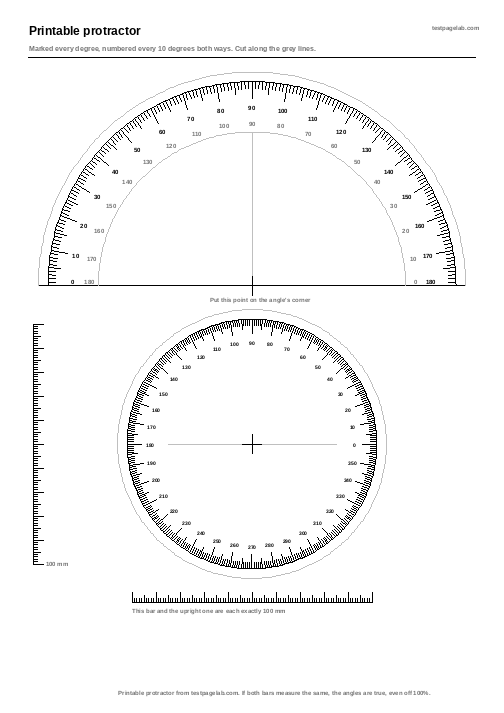
A printable protractor marked every degree: a 180 degree protractor 17 cm across, numbered both ways, and a full 360 degree circle, on one sheet of US Letter or A4. Print it, cut it out, and measure or draw any angle. Two bars on the sheet, one across and one upright, show whether your printer kept the angles true.
Download the protractor
One PDF for each paper size: print the one that matches the paper in your printer.
What's on the sheet
- A 180 degree protractor, 85 mm in radius, 17 cm across: a mark every degree, longer marks every 5 and 10 degrees, and two scales numbered every 10 degrees, the outer from 0 at the left and the inner from 0 at the right. A cross marks the centre on the base line.
- A 360 degree protractor, 52 mm in radius: a mark every degree, numbered every 10 degrees from 0 to 350, counterclockwise from the right.
- Two 100 mm bars, one across the sheet and one upright, to check the print (below).
How to use a protractor
- Put the centre cross on the corner of the angle, the point where its two sides meet.
- Turn the protractor until the base line lies along one side of the angle.
- Read the number where the other side crosses the scale. Read the scale that starts at 0 on the side you lined up: the outer numbers if it runs along the left half of the base line, the inner numbers if the right.
To draw an angle, draw a line, put the centre cross on one end of it with the base line along it, and make a dot at the number you want. Take the protractor away and join the dot to the end of the line.
For an angle larger than 180 degrees, use the 360 degree protractor, or measure the smaller angle on the other side and take it from 360.
Print it and check it
Print at 100% (Actual size), with Fit to page off, and cut along the grey line outside each scale.
Angles have one useful property here: they don't change when a drawing is scaled evenly. A protractor printed at 97% still reads every angle correctly; it is only smaller. What changes angles is a print stretched more in one direction than the other, and that is what the two bars are for. Measure both. If they are the same length, even if it isn't exactly 100 mm, the angles are true. If one is longer, the printer stretched the page more one way than the other: print again at 100%, with the paper size in the print dialog matching the paper in the tray.
For the sizes to be exact too, both bars should measure 100 mm. The printable ruler checks a print's scale in detail, with a bank card outline.
Frequently asked questions
How do I use a printable protractor?
Cut it out along the grey line. Put the centre cross on the corner of the angle, lay the base line along one side, and read the scale where the other side crosses it. To draw an angle, mark the number you want at the edge and join the mark to the centre.
Which scale do I read on a protractor?
The one that starts at 0 on the side of the angle you lined up with the base line. If that side runs left from the centre, read the outer numbers; if it runs right, read the inner ones. The two scales let you measure from either side without taking anything from 180.
Does a printable protractor have to print at 100%?
For the angles, it only has to print evenly: an evenly scaled protractor reads every angle correctly, just at a smaller size. Measure the two bars on the sheet; if they match, the angles are true. For the protractor to be its full 17 cm across, print at 100%.
How can I make a printed protractor sturdier?
Print it on card stock, or glue it to thin cardboard before you cut it out. For a see-through protractor, print it on transparency film made for your kind of printer, so you can see the lines underneath.
What is the 360 degree protractor for?
Angles larger than 180 degrees, and bearings. Put its centre on the corner of the angle with 0 along one side, and read the other side's number directly, up to 359 degrees, without subtracting.